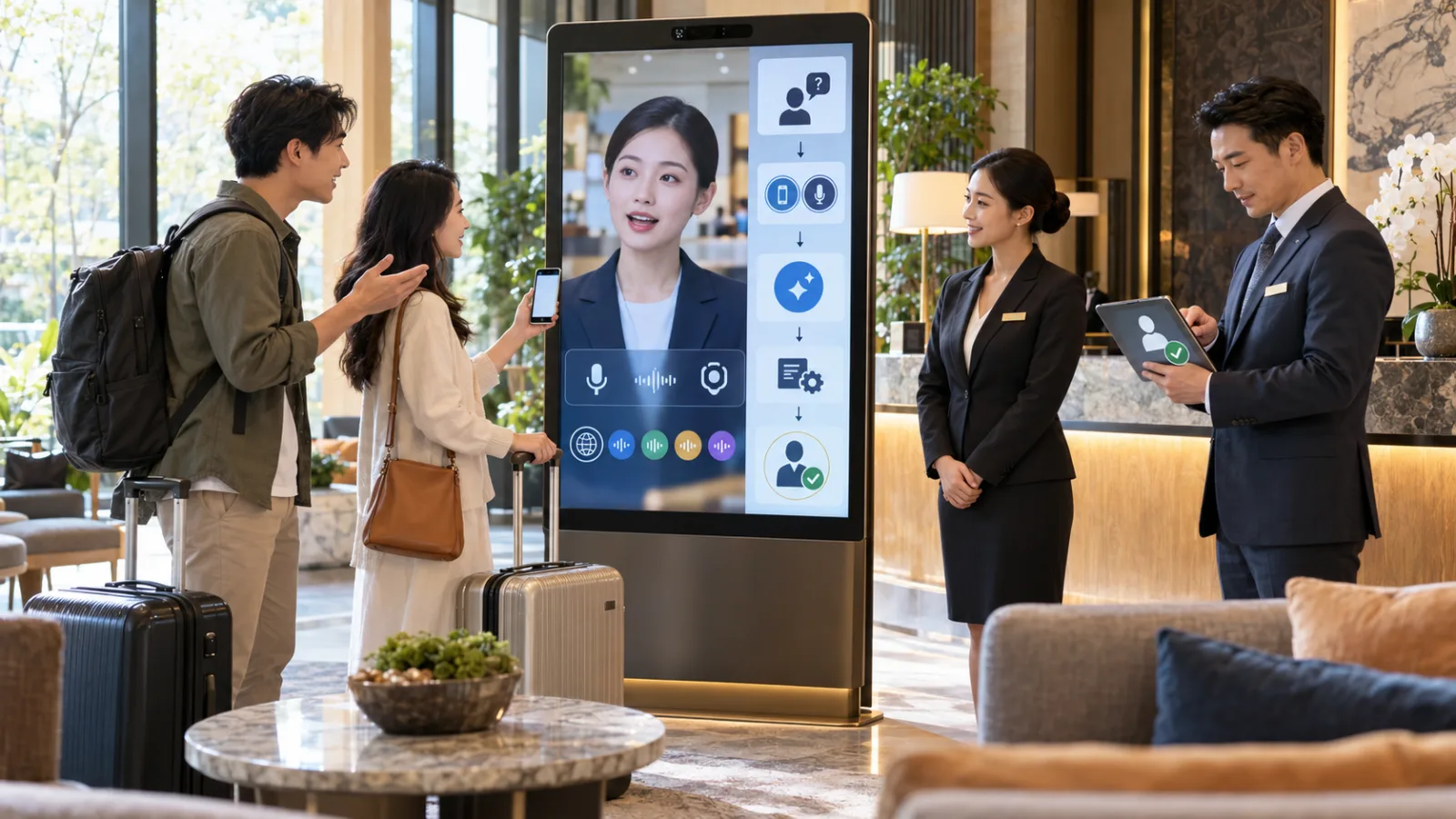
Previously, AI Voice Agents typically featured very simple visuals.
You would interact with them through:
- Phone calls.
- Apps.
- Smart speakers.
And the AI would respond with:
a voice.
Now, Google wants to take it a step further.
Not just:
letting AI speak,
but rather:
letting you see an AI that’s talking to you.
On September 24, Google officially launched:
Gemini 3.8 Live with Live Avatar.
This combines:
- real-time voice
- real-time visual understanding
- virtual characters
- backend agent workflows
into one seamless live dialogue experience.
The best use cases aren’t:
“Help me write an article.”
but rather:
tasks requiring continuous interaction
such as:
- customer service
- hotel front desk
- event guides
- education
- product consultation
- remote assistance
Understanding: Live Avatar Is Not Just a Typical AI-Generated Video
This is crucial.
Typical AI Avatar tools usually involve:
first inputting a script,
then waiting for AI to generate a video.
Gemini 3.8 Live with Live Avatar
works differently.
It’s more like a:
real-time video call.
You say something.
The avatar immediately:
- understands
- responds
- syncs lips with AI-generated voice
- updates facial expressions dynamically with the conversation
It does not:
pre-record entire video segments before playback.
Built on Gemini 3.8 Live
Gemini 3.8 Live itself is a:
real-time conversational model.
The key difference from common text prompt models is:
it processes speech-to-speech directly.
This means:
- You speak.
- The AI doesn’t necessarily need to fully transcribe your speech into text first,
- then generate text,
- then pass it to a separate TTS system.
Google integrates listening, understanding, responding, and speaking
into a single live model.
This is why it suits continuous conversation well.
Adding a Layer of Visual Presence: Live Avatar
Google now adds a synchronized video avatar.
The Live Avatar can:
- sync lip movements
- match facial expressions
- respond visually
based on generated speech.
This means users do not just hear a voice bot,
but see a digital character actively talking to them.
Supports 97 Languages
This makes it especially suitable for:
multinational customer service.
Google states:
Gemini 3.8 Live with Live Avatar
can understand and speak
97 languages.
Automatic language detection allows switching languages during conversation,
with lip-sync and expressions adapting accordingly.
For example, a hotel front desk can handle a guest speaking English, then Japanese, then Spanish,
without needing separate pre-recorded avatar videos for each language.
Much Lower Costs Compared to Traditional Multilingual Digital Humans
Traditional digital humans with 10 languages often require:
- 10 voice sets
- Scripting
- Recordings
- Avatar content per language
Updating content often involves full rework.
Live Avatar generates content on the fly during conversation.
Enterprises maintain:
- knowledge bases
- rules
- backend tools
- permissions
instead of thousands of pre-recorded videos.
More Than Just Listening—It Can Also See
This is more practical than just the avatar appearance.
Gemini 3.8 Live supports:
- live visual understanding
- camera feeds
- screen sharing
- audio simultaneously
User can talk and show AI what they see.
Example: Hotel Guests Can Show Their Screens
If a guest says,
“Does my reservation include breakfast?”
and points their phone screen at the camera,
the avatar can first understand the screen content,
cross-reference backend reservation data,
and give an accurate response.
If a change such as room upgrade or refund is needed,
it can escalate to human approval.
This is easier than having the customer read out their reservation number, name, plan, and dates.
Great Fit for Remote Technical Support
For example, if a customer doesn’t know which router light is faulty,
instead of confusing verbal instructions—
- “Look at the third light from the left.”
- “Which one?” >
the AI can view the camera feed pointed at the device,
and guide the customer step-by-step where to look.
Note this is one use case of live visual understanding,
not that Gemini already has every router’s repair info.
Companies need to connect their own knowledge base, product data, and workflows.
Screen Sharing Suits Software Support
If a customer says,
“I can’t find the export button,”
instead of a back-and-forth trying to describe UI elements,
the agent can see the user’s shared screen and:
- directly guide them based on current UI state
This greatly reduces context loss compared to only voice/text descriptions.
The Real Innovation Is Not the Avatar, But “Doing While Talking”
Google Cloud emphasizes that during live conversations, the agent can use backend tools, APIs, and enterprise systems to complete tasks
without fully pausing the dialogue.
Traditional voice bots usually go:
- Customer speaks one sentence
- pause while system looks up info
- pause again to answer
which feels very unnatural.
Google aims for:
“Let me check for you.”
agent handles backend simultaneously,
while maintaining conversational context.
This Is the True “Live Agent”
Not just an animated figure with moving lips, but one that:
- understands
- looks
- searches data
- uses tools
- manages workflows
The avatar is just a more natural front-end for real-time interaction.
What Use Cases Are Likely to Offer Early Value?
1. Customer Service
Best for high-volume, repetitive voice interactions such as:
- order inquiries
- product explanations
- basic troubleshooting
- policy clarifications
2. Hospitality and Tourism
Hotels, airports, tourism info centers, and visitor centers
naturally require multilingual support with many repetitive questions.
3. Education
For example, virtual tutors where students can ask questions by voice,
show assignments, diagrams, or screens,
and get instant answers.
Human review remains necessary for grading and important assessments.
4. Retail
At in-store kiosks, customers can show products to a camera and ask about differences, specs, usage, and stock.
Connecting to enterprise product data reduces manual lookups.
However, prices, promotions, and inventory should rely on official backend data.
5. Remote Assistance
Ideal for cases where customers can’t easily describe what they see in devices, software screens, assembly, or operations.
The agent seeing the same visual context is often much more effective than verbal explanations alone.
Important: This Is Not a New Button in Regular Gemini Apps
If you look for “Avatar Mode” in current Gemini apps, you likely won’t find it,
because Google’s official announcement targets:
Gemini Enterprise and APIs
aimed at:
developers and enterprises building their own:
- customer service
- tutors
- concierge
- kiosk
- agent experiences
This is not a consumer feature for instant video chat with a changed avatar today.
Gemini 3.8 Live Is Generally Available
Google Cloud classifies Gemini 3.8 Live with Live Avatar as:
Generally Available (GA)
meaning it’s production-ready, not just a private demo.
It currently offers US and EU multi-region endpoints,
with pay-as-you-go and provisioned throughput pricing.
Custom Avatars Aren’t Fully Open Yet
Google provides preset avatars—pre-made virtual characters.
Enterprises wanting branded characters or custom avatars from a high-quality reference image
still require:
enterprise allowlist approval.
This isn’t yet a feature allowing anyone to upload a photo and instantly create a Gemini Live Avatar.
Keeping a Character’s Appearance Raises Identity Concerns
Allowing avatar creation from reference images creates risks of impersonation, deepfake, and brand misuse.
Google adds safety measures around identity.
All AI-generated audio and video will embed SynthID, an invisible AI watermark designed to help identify generated content.
SynthID Doesn’t Prevent Misuse Alone
Like AI image/video watermarks, SynthID signals provenance,
but it’s not permission or portrait rights authorization.
Enterprises must still ensure:
- person and brand authorization
- usage boundaries
- transparency
- data retention policies
Additional Caution for Customer Service: Don’t Let Avatar Faces Increase False Trust
This is an easily overlooked issue.
Plain text AI mistakes are easier to doubt.
A lifelike avatar with natural expressions, synchronized lips, and smooth voice
can make wrong answers seem more believable.
Looking more human does not mean the answers are more accurate.
Enterprises must prioritize grounding, knowledge, permissions, and escalation protocols.
Customer Service KPIs Matter More Than Lifelikeness
Key performance indicators should track:
- problem resolution rates
- answer accuracy
- first-call resolution proportion
- transfer rates to live agents
- proper halting of high-risk actions
- customer time savings
An avatar that looks great but always gives wrong stock info
is just an attractive but faulty interface.
Start With Low-Risk, High-Volume Scenarios
Good examples include:
- business hours
- basic service descriptions
- facility guidance
- product operation steps
- booking procedures
- order status queries
These scenarios have well-defined data, are easy to verify, and have high repetition,
making them ideal for testing if Live Agents can outperform traditional voice bots.
Avoid Letting It Handle:
- payments
- refunds
- order cancellations
- formal contracts
- medical judgments
- major financial decisions
- sensitive personal data updates
Not because AI avatars are inherently riskier,
but because such actions demand stronger human approvals.
Consider a Three-Tier Workflow
Tier 1: Respond
Query official knowledge base and answer questions.
Tier 2: Prepare
Assist with data entry, requirements gathering, and prepare actions.
Tier 3: Execute
Perform refunds, payments, cancellations, order changes, and official submissions.
More automation is possible in Tier 1, but the further you go towards Tier 3,
the greater the need for human approval.
This design is more reasonable for enterprise agents.
Google Renders Live Avatar as 24 FPS Real-Time Video
The developer guide notes Gemini 3.8 Live can generate synchronized:
24 FPS live avatar video
with 24 kHz audio.
The core goal is continuous conversation,
not the staggered, sentence-by-sentence cadence of early digital humans.
Natural interaction includes:
- interruptions
- pauses
- topic switches
- continuing context
It Also Understands Tone
Gemini 3.8 Live introduces affective dialogue.
The model assesses:
prosody, tone, pauses, and speech inflection,
to estimate user's current emotions and speaking state,
then adjusts voice tone and conversation rhythm accordingly.
For instance, if a customer is anxious,
the AI shouldn't slowly deliver lengthy background explanations.
However, this remains model estimation, not true psychological analysis.
Proactive Audio Features
Google adds background audio filtering.
The model distinguishes between:
- speech directed at it,
- and surrounding ambient noise.
This is critical for noisy environments such as lobbies, exhibitions, stores, and airports,
because real-world spaces are rarely as quiet as demo rooms.
Costs Should Be Measured Per Conversation, Not by Avatar Licenses
This is an API/enterprise tool.
Google Cloud charges separately for:
- text input
- image/video input
- audio input
- text output
- audio output
- avatar video output
There are pay-as-you-go and provisioned throughput options.
True project costs should be considered as cost per completed conversation,
not just model unit price.
For Customer Service, Consider Factors Like:
- average interaction length
- amount of audio input
- camera feed usage
- avatar video duration
- backend tool calls made
- final resolution rate
If AI avatar service is cheaper than human agents but half the sessions transfer to humans,
costs for both need to be combined.
Choosing Your First Pilot for Live Avatar
Don't aim to replace all customer service at once.
Select a narrow, well-defined problem such as:
- hotel check-in, facilities, and breakfast explanations
- exhibition layout and exhibit information
- retail product specs and store inquiries
- SaaS account setup and common operations
Run 100–500 real interactions, monitor accuracy, average handling time, transfer rates, satisfaction, and costs before expanding.
The Real Breakthrough Isn’t “AI Finally Has a Moving Face”
AI avatars aren’t new.
The novelty lies in avatars being embedded directly in real-time agents that can:
- listen
- see
- respond
- maintain context
- work with backend workflows
and use a visual character to hold continuous conversations.
This is the key highlight today.
New Challenges Arise in Human-AI Interaction
Previously, website chatbots only needed to clearly indicate “this is AI.”
Future digital agents with natural expressions, emotional voice, and lifelike appearances
require more transparent disclosures on:
- that they are not human
- what data is collected
- whether camera is on
- screen sharing details
- conversation storage
- automated actions
- escalations to humans
The more humanlike the AI, the more important transparency becomes.
How Should Taiwanese Users View This Tool Today?
If you are a general Gemini user,
don’t rush to find a Live Avatar button.
It’s not a consumer filter feature.
If you are an enterprise or developer building customer service, education, tours, or interactive products,
the key question is:
does adding visual AI and avatars truly improve any step of the existing voice/chat process?
If not, there’s no need to force avatar integration.
The Visuals Themselves Are Not the ROI
If a support issue takes 30 seconds via voice alone,
and adding an avatar still takes 30 seconds while the customer doesn’t care about seeing a face,
then the avatar just adds cost.
But when trust-building, demoing operations, visual interaction, multilingual support, or long interactions are needed,
visual presence may truly enhance the experience.
Remember One Thing
Gemini 3.8 Live with Live Avatar’s real progress is not:
“AI finally has a moving face.”
but rather:
“a live agent that can listen, see, talk, and use a persistent visual character to complete tasks with users.”
The more humanlike it looks,
the more important it is to clarify identity, data usage, permissions, and when to escalate to humans.
So the most important test today isn’t how realistic the avatar is,
but whether it truly makes formerly stuck AI interactions faster and clearer, while knowing when to hand off decisions.
Today, grow a bit with AI.
Learn one AI skill daily.
Save a bit more time every day.
Improve your capabilities steadily.
SasaDaily, growing with you.